A Marketer's HTML/CSS Journey: Getting Started with Bootstrap
In my previous post, I covered what Bootstrap is and why it's useful for marketers to learn frameworks like it.
In this post, let's dive into the exciting part — actually getting Bootstrap up and running so we can start experimenting, and preparing to practice building a single page!
Bootstrap! What Do I Need to Install?
Bootstrap doesn't require installing any special "programs." So what exactly do we need to prepare?
- First, you'll obviously need the code editor you set up for web development. (Atom, Visual Studio Code, Sublime Text, etc.)
- You need to create a blank HTML file for practice.
- Then you just need to connect Bootstrap to that HTML file!
While you don't need to install a full program, there are a few preparation steps involved. I'll call this process "connecting." There are two main ways to do this (there are more methods out there, but at our current level, I don't think we need to know — or worry about — them):
-
Download the JavaScript and stylesheet files from the Bootstrap site
Download the files from the Bootstrap website and link them in the head section of your HTML file using link and script tags.
-
Connect via CDN (Content Delivery Network)
Copy the relevant code from the Bootstrap site and paste it into your HTML file.
At first glance, option 2 — the CDN method — looks much easier for practicing and experimenting, since all you have to do is paste the code Bootstrap provides into the right spot. In practice, most people use the CDN method for learning because it's so simple!
(So when would you use the download method? When developing internal corporate systems, there are cases where development happens in environments without internet access for security reasons. In those cases, you can't use CDN, so you'd go with the download approach!)
Wait — What Is CDN?
CDN (Content Delivery Network)
Typically, companies and users make their content accessible via web servers over the internet. However, depending on the content size, traffic volume, and the physical distance of the web server, various issues can arise — like slow access and downloads. CDN was introduced to address this. It works as a supplementary server system alongside the main (origin) web server, using cache servers that store various types of content to distribute traffic and improve efficiency.
But to put it simply at our level: it's a way to pull Bootstrap CSS and JavaScript files stored on another server into your HTML document and use them.
How to Use the Download Method
- Download the files from the Bootstrap site.
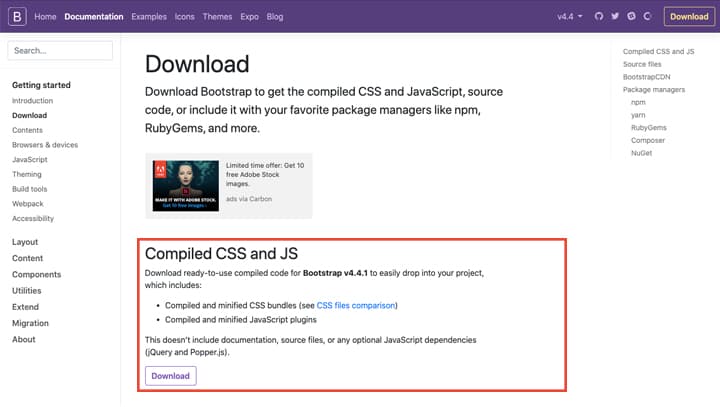
Since you'll need to specify file paths when linking them in your HTML document, download them somewhere easy to find.
- Pick out the files you need and add links in the head tag.
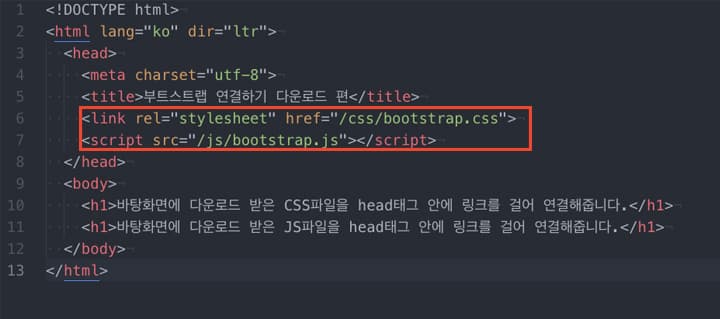
If this feels complicated, refer to the Bootstrap documentation page and copy the relevant sections — just make sure the file paths match. (See the image below.)
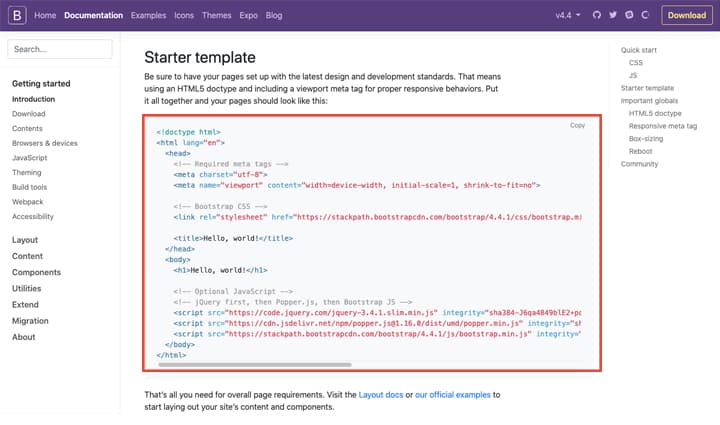
Example: If you create a folder called "bootstrap" on your desktop, and inside it create "css" and "js" folders where you place the files:
- CSS file link: /bootstrap/css/bootstrap.css
- JS file link: /bootstrap/js/bootstrap.js, etc.
How to Use the CDN Method
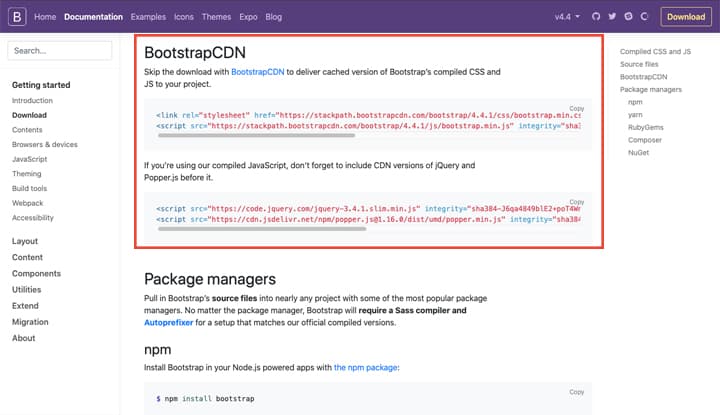
Copy the relevant code and paste it into the head tag of the HTML file where you want to use Bootstrap.
Alright, with that, all the preparation is done! So how do we start experimenting?
Before jumping into building a landing page, it's important to look at various examples to understand how web pages are structured. Browse through the sample templates provided by Bootstrap, and explore the different components available — navigation bars, carousels, buttons, and more. Practice applying these to a blank HTML file.
Today we laid the groundwork for getting Bootstrap set up and starting our hands-on experimentation. If you keep practicing by applying Bootstrap components from here on, building a landing page later won't be all that difficult.
However, one of the most important concepts in using Bootstrap, in my personal opinion, is the grid system. This is really crucial, and it's something I found a bit confusing myself, so in the next post I'll break down Bootstrap's grid system and prepare to build a proper landing page.