How to Install Claude Code Plugins from the Marketplace
A plugin bundles skills, subagents, hooks, and MCP servers into a single install. A marketplace is the shelf where these bundles sit, and installing is a two-step process: pick one off that shelf and add it. If last lesson had you pin your project's rules into a single CLAUDE.md file, today you install an extension that actually runs on top of those rules. Just here for plugin install or removal syntax? This lesson alone covers it. Marketplace listings and install commands can shift a bit release to release, so cross-check the official docs if you're reading this well after today.
- Marketplace
A marketplace is a catalog of plugins other people have built and shared. Registering a marketplace doesn't install a single plugin on its own. Registering just makes the catalog browsable; actually pulling a specific plugin down from that catalog is a separate install step.
What a marketplace is: a shelf of plugins
The official docs compare this structure to an app store. Installing the store app doesn't automatically install everything inside it, and the same holds here: registering a marketplace installs zero plugins by itself. Registering announces a catalog to Claude Code; installing picks one item out of it. Mix the two up and you get the confusion of "I added a marketplace and nothing shows up." That's normal. You just haven't installed anything yet.
Marketplaces split into three tiers of trust.
| Type | Name | How it's registered | What's in it |
|---|---|---|---|
| Official Anthropic marketplace | claude-plugins-official | Registered automatically the first time you run Claude Code interactively | Plugins Anthropic reviewed and published directly: code intelligence, integrations with outside services like GitHub and Slack, security-review tools, and more |
| Community marketplace | claude-community | Registered by hand with /plugin marketplace add anthropics/claude-plugins-community (the registered name, claude-community, differs from the repo name) | Third-party plugins that passed Anthropic's automated verification and safety review. Each entry is pinned to a specific commit |
| Demo marketplace | claude-code-plugins | Registered by hand with /plugin marketplace add anthropics/claude-code | A set of examples Anthropic maintains to show off the plugin system itself. This is the exact target the official install tutorial uses |
Remember lesson 1 flagging plugins as different from the other four? CLAUDE.md, skills, subagents, and hooks all replace something you'd build yourself, while a plugin replaces installing something someone else already built. A marketplace is exactly where those "someone else built it" plugins live. You can register a personal or team repo as a marketplace too, but for now it's faster to just install one of the three that already exist.
Knowing what's on the official marketplace helps when you're picking later. Some highlights: plugins that connect GitHub, Slack, or Notion straight in as preconfigured MCP servers; plugins that help with code analysis for languages like Python and TypeScript; plugins that bundle repeated tasks like commits and pull requests into skills. A lot of these don't apply to non-code work like marketing or content, but the pattern of packaging a repeated procedure as a skill for distribution is exactly the frame you'll reuse in the next lesson, when you turn your own procedure into a skill.
Installing and running one
Type /plugin and you get a screen with four tabs: Discover (browse plugins across every marketplace), Installed (view and manage what's installed), Marketplaces (manage registered marketplaces), and Errors (check plugin load errors). You can click through it by hand, but this lesson walks through typing commands directly. Either way, the result is the same.
Let's install for real, using the same demo marketplace the official docs use as their example. Open a Claude Code session in your terminal and follow the steps below in order.
/plugin marketplace add anthropics/claude-codeThis one line registers a marketplace named claude-code-plugins. It downloads the catalog file from the GitHub repo and adds it to your list; nothing gets installed yet. Next, install the commit-commands plugin from this marketplace. It's an item that packages the procedure of writing a commit message and pushing it into a set of skills.
/plugin install commit-commands@claude-code-pluginsThe @marketplace-name suffix after the plugin name exists to disambiguate when the same plugin name shows up in more than one marketplace. Running this command brings up a screen where you choose an install scope.
| Scope | Meaning |
|---|---|
| User (default) | Every project on your machine, just you |
| Project | Applies to every collaborator on this repo, recorded in .claude/settings.json |
| Local | Just this repo, just you, not shared with collaborators |
For a first install, user scope is the reasonable default. You can try it across multiple projects right away, and the removal process is the same regardless of scope if you change your mind.
The install screen also shows what the plugin contains and how much it adds to context on every turn. To check the same information later from the terminal, use:
claude plugin details commit-commands@claude-code-pluginsRunning that command for real returns this.
| Item | Value |
|---|---|
| Skills included | clean_gone, commit, commit-push-pr (3) |
| Agents, hooks, MCP, LSP servers | None |
| Persistent context cost | About 103 tokens |
Per-call cost (e.g. commit) | Under 20 tokens persistent, about 180 tokens when it runs |
That means you already know, before installing, that it's three skills and nothing else, no hooks, no MCP servers. Seeing this inventory upfront, before deciding whether to install, is the whole point. Once installed, this plugin's skills carry a plugin-name prefix, like /commit-commands:commit, so a different plugin with a skill of the same name never collides with it.
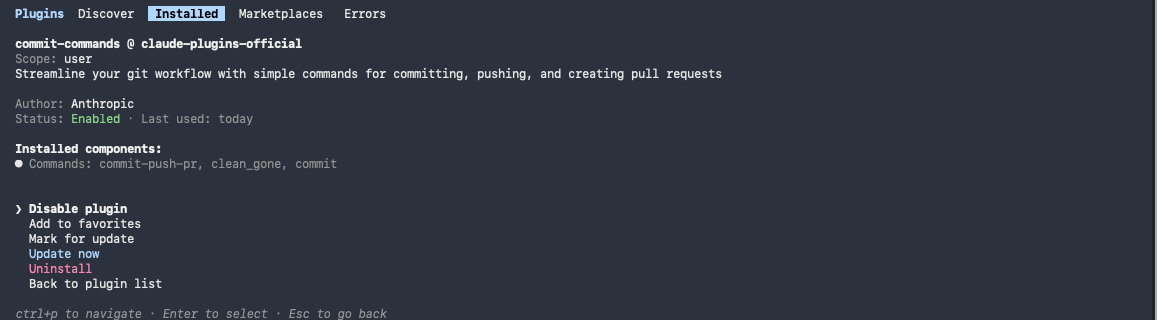
Right after installing, open the plugin from the Installed tab of /plugin and you can see the three commands it ships with.
/plugin, open the plugin manager, and go to the Installed tab to check that commit-commands shows up. Or type /help and check whether commit-commands:commit shows up newly in the skill list. Either one showing up means this lesson's deliverable is done.If it's not a fit, remove it
Autocomplete carries "plugin removal" about as often as it carries "plugin marketplace." Installation is well documented; uninstalling is comparatively less well known. Let's walk through cleaning up the plugin you just installed.
To remove a plugin entirely:
/plugin uninstall commit-commands@claude-code-pluginsTo turn it off temporarily instead of removing it, use disable. Turn it back on with enable, same name.
/plugin disable commit-commands@claude-code-pluginsTo pull a marketplace itself off your registered list:
/plugin marketplace remove claude-code-pluginsOne thing worth being careful about here. The official docs warn that removing a marketplace also removes every plugin you installed from it. If you want to drop just the marketplace and keep the plugin, the order matters: don't remove the plugin first and the marketplace second, keep the marketplace registered for as long as you're still using anything from it. If you installed, removed, or toggled anything mid-session, run /reload-plugins once to make it take effect without restarting.
If you'd rather manage this from a screen instead of commands, open /plugin and go to the Installed tab. Plugins with problems sort to the top, favorites come next, and disabled plugins collapse at the bottom, so a long list still stays easy to scan (as of the August 2026 UI). Plugins you haven't used in over two weeks and over ten sessions also get pulled into a separate Not used recently section (August 2026 behavior), handy for clearing out something you installed long ago and forgot about.
Using someone else's plugin: check source and inventory
Plugins don't only carry skills. Hooks and MCP servers can come bundled in too. The official docs are direct about this: plugins and marketplaces are components that can run arbitrary code on your own machine, under your own permissions, and that calls for real trust. Anthropic doesn't directly control the MCP servers, files, or other software bundled inside a plugin, and doesn't verify that they behave as intended.
So you need a checklist before installing.
- Which marketplace did it come from? The official marketplace is reviewed directly by Anthropic, and the community marketplace only carries items that passed automated verification and a safety review. Register some unfamiliar repo as a marketplace on your own, and you've stepped down a trust tier.
- Check the inventory before you install. As you saw above, the install screen lists exactly which skills, agents, hooks, MCP, and LSP servers a plugin bundles. Whether it includes hooks or MCP servers is especially worth checking, since unlike skills, both of those can run on their own at a set moment, or reach out to something external, without you calling them.
- Scope it narrow and try it first. For a plugin you're using for the first time, run it at project or local scope in one repo before you widen it to user scope, once you're confident there's no issue.
There's a skill someone else built that I still reach for every day: a brainstorming skill that widens an idea before narrowing it down, and it runs before I ever start designing a feature. In my case it didn't come through the marketplace. I grabbed it from a public repository and dropped the folder in by hand. The plugin install you're learning here collapses that manual step into a single manager screen. Either way, once you've had the experience of using something ready-made instead of building it, the order flips. The next time you need something, you check whether someone has already built it first. Here's the rule of thumb that comes out of that. If the procedure you need right now isn't something only you deal with, organizing ideas, reviewing code, cleaning up commit messages, things anyone runs into, check the marketplace first. If it's a procedure that's half your company's own terms and conventions, though, something you install will need more fixing than it's worth, so building it yourself, the way the next lesson walks through, is faster. Even before you build your first one, opening someone else's plugin just to see how it's put together makes the marketplace a decent textbook on its own.
The risk MCP servers themselves carry, what a malicious server is after and how to screen for it, is the same axis already covered in Track 2 (Connect). No need to repeat it here; that lesson covers it.
- Registering a marketplace and installing a plugin are two separate steps. Registering alone installs nothing.
- Marketplaces come in three trust tiers: official (auto-registered), community (vetted third-party), and demo (examples only)
- Install with
/plugin install <plugin>@<marketplace>, choosing user, project, or local scope - Remove with
/plugin uninstall, disable temporarily with/plugin disable, and removing a marketplace itself takes every plugin installed from it down with it - Plugins can bundle hooks and MCP servers, so check the inventory and the source before installing
Frequently asked questions
How do I uninstall a Claude Code plugin?
Run /plugin uninstall <plugin name>@<marketplace name> to remove it completely. To turn it off temporarily instead, use /plugin disable, and turn it back on with /plugin enable under the same name. Removing a marketplace itself with /plugin marketplace remove also removes every plugin you installed from it, so be careful with that one.
I registered a marketplace but no plugins show up.
Registering and installing are different steps. Registering a marketplace just adds its catalog to the list; it doesn't install anything. Type /plugin, open the Discover tab, and install the plugin you want from the marketplace you just registered. If a plugin you expect still isn't showing up in an already-registered marketplace, try refreshing the catalog with /plugin marketplace update <name>.
How do I know if an installed plugin is safe?
The install screen's inventory (Will install) shows exactly which skills, agents, hooks, and MCP servers a plugin bundles, before you commit. Hooks and MCP servers deserve extra attention, since they can run or communicate externally without you calling them directly. Plugins from the official marketplace or a vetted community marketplace carry a higher trust level.
Which install scope should I pick: user, project, or local?
User scope is convenient if you're using the tool solo across multiple projects. Project scope, recorded in .claude/settings.json, makes sense when every collaborator on a team repo needs it too. Local scope is for just this repo, just you, not shared with collaborators.
Do I need to restart after installing or removing a plugin?
No restart needed; run /reload-plugins and it takes effect right inside the session. Newly loaded skills, hooks, or MCP servers get announced to context starting with the next request, which costs a small number of tokens, but you don't need to open a fresh session.
Do I need to register the official marketplace myself?
No. The official Anthropic marketplace, claude-plugins-official, registers itself automatically the first time you run Claude Code interactively. The ones that need manual registration are the demo marketplace (claude-code-plugins) covered in this lesson, and the community marketplace (which registers under the name claude-community). Run /plugin marketplace list to check which marketplaces are currently registered.
Sources (3)Expand to see all sources
- Claude Docs, "Discover and install prebuilt plugins from a marketplace": how the two-step structure works, the official/community/demo marketplace distinction, install scopes (user, project, local), the install screen's context cost and Will install inventory, install/disable/remove commands and the marketplace-remove warning, trust guidance (checked 2026-08-22)
- Claude Docs, "Building plugins": what a plugin bundles (skills, agents, hooks, MCP servers, LSP servers), testing with --plugin-dir, how /reload-plugins works (checked 2026-08-22)
- Verified locally (the link points to the official doc it was checked against): Output of `claude plugin --help` and `claude plugin marketplace --help`: confirmed locally that the install/uninstall/enable/disable/marketplace add/remove subcommands match the docs. Output of `claude plugin details commit-commands@claude-code-plugins` also reproduced locally, showing the ~103-token persistent context cost (3 skills, 0 agents/hooks/MCP/LSP) (version 2.1.239, checked 2026-08-22)